

These are the best free budget templates around – mostly from fellow personal finance bloggers! How awesome is that? ;) I have to put mine at the top, of course, but ANY of these have the potential of working well nicely.
Remember, none of these budgets are perfect, but you can tweak & edit and use the one that’s the most perfect for YOU. I change mine up every once in a while – getting rid of the parts that don’t make sense any more, and adding in those which do – but the important part is FIRST choosing a workable template. So hopefully one of these works.
Last updated: 12/17/24
Best Free Budget Templates & Spreadsheets:
Here are the best free budget templates I’ve found so far! If you come across any others you think are worth adding, drop me a note. I’m always looking for more great ones ;)
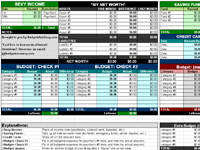 “Financial Snapshot & Budget” @ Budgets Are Sexy “Financial Snapshot & Budget” @ Budgets Are SexyGoogle Doc | Excel A colorful and easy way to track your budget and overall Financial Snapshot! Room to budget per paycheck, detail your net worth (if you want), credit card balances, savings funds, total income, and an extra budget just in case :) |
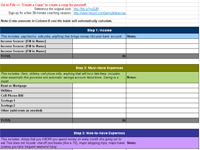 “4 Step Budget Template” @ Life After College “4 Step Budget Template” @ Life After CollegeGoogle Doc | More details Most budgets are too cumbersome to be useful (in my humble opinion). Check-out this handy four-step budget: After filling in income, must-have expenses and nice-to-have expenses, you’ll get a “monthly allowance” for you to spend on discretionary items as you’d like, with the peace of mind of knowing that your main expenses are taken care of. |
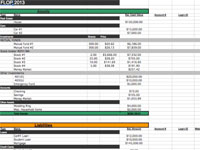 “FLOP: Financial Life on One Page” @ Christian PF “FLOP: Financial Life on One Page” @ Christian PFExcel | More details | His other great templates! I love this one because it’s a single file for all your financial account details. It has three main purposes: a balance sheet, a place for all login info, and a financial roadmap. And Bob recommends keeping an updated file of this somewhere safe in case a family member needs at any point. |
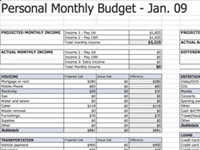 “Personal Monthly Budget” @ My Money Shrugged “Personal Monthly Budget” @ My Money ShruggedGoogle Doc | Net Worth Google Doc | More details This budget spread sheet works because it allows you to put in projected and actual income and cost and then shows you the difference. It is a great way to be able to compare each category or individual areas. This budget is also broken up into different categories based on major areas of your budget – housing, transportation, insurance, food, savings, etc. |
 “E.O.D. Deluxe Budget 2.0” @ Enemy of Debt “E.O.D. Deluxe Budget 2.0” @ Enemy of DebtExcel EOD Deluxe Budget 2.0 is a comprehensive budget spreadsheet including a zero-based budget, an allocated spending worksheet, a checking account ledger, a savings allocation worksheet, as well as a lump sum payment schedule. |
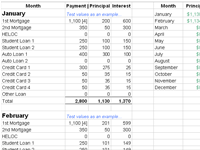 “How Much Debt Costs You” @ Debt Free Adventure “How Much Debt Costs You” @ Debt Free AdventureGoogle Doc Complete with CHART. Figure out how much your debt costs you each month. Specifically, how much of your loan payments are allocated toward interest (paying for the debt) and how much toward principal (paying the debt down.) *Included are 3 sheets: Data, Chart, and Print* |
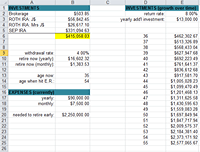 “Early Retirement Spreadsheet” @ Budgets Are Sexy “Early Retirement Spreadsheet” @ Budgets Are SexyExcel | Version 2 | More details*NEW* I put this together to help me calculate how far away early retirement / financial independence is. It’s not budget-related, but if your dream is to retire and do what you want before your 60s, I highly advise running your numbers and seeing if they make you happy ;) If not, time to start tweaking! |
Another Recommendation – Empower:
While this tool focuses more on investments and net worth tracking than budgeting, this is a fantastic, FREE tool for seeing everything in one spot – similar to my “financial snapshot” spreadsheet, only it’s automated ;)
Here’s a snapshot of what their dashboard looks like:
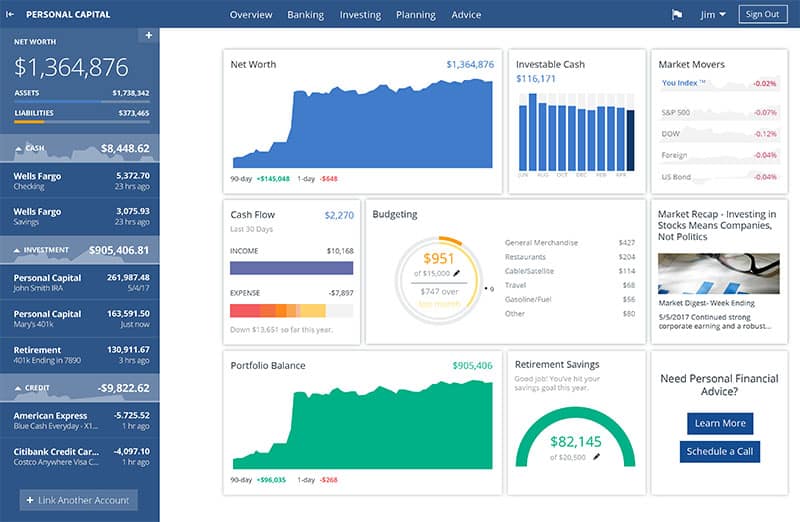
And here’s a review we did on the blog about Empower (formerly called “Personal Capital”) from a millionaire friend of mine who’s addicted: Why I Use Empower Almost Every Single Day
Other Great Templates & Spreadsheets:
Sometimes less options are better, but I didn’t want to leave you hangin’ if none of those above options did the trick for ya. Keep in mind that all these spreadsheets & templates are customizable, but see if you like any of these better: (I’m listing them out or else this page would go on forever ;))
- My Money Blog: Within Your Means (excel – created by leisure guy)
- My Money Blog: Spreadsheet #2 (excel – by Neil Rothma)
- Pear Budget: Original Spreadsheet (excel)
- Budgets Are Sexy: Early Retirement Spreadsheet (excel)
Best *Online* Budgeting Sites:
And now, we’ve got the places online where you can budget & track all your financials instead of manually doing them yourselves. Well, you’ll still have to manually keep up with this stuff online, but most of these places make it super easy for you:
- Empower (free) – This one concentrates more on investments and net worth, and not so much budgeting per se, but it’s a GREAT tool to try out and people rave about them. I recently signed up myself and it’s awesome seeing everything in one spot, similar to my “financial snapshot” spreadsheet up above, only automated. Here’s a review we did on the blog about it from a millionaire friend who’s addicted: Why I Use Empower Almost Every Single Day
- YNAB (You Need A Budget) (free for 34 days, and then $109/year (comes out to $9.08/mo)) This is the darling of the bunch, and almost every blogger I know is a fan of theirs – I have yet to hear a complaint. And although I don’t use them personally, I’m friends with the founder (Jesse Mecham) and I can vouch for how much care and attention he and his team put into it. Highly recommend if you haven’t found a system that works for you yet. UPDATE: Here’s a recent article we did on them – hope it helps!: YNAB Review: “YNAB Completely Changed Our Financial Life”
- Tiller (Free for 30 Days, then $79/year (which comes out to roughly $4.92/mo) These guys are great because they combine both *automation* and *spreadsheets*! Gonna just quote from their site here as it says it all – “Personal finance spreadsheets without tedious data entry. Manage your money in a spreadsheet 10X faster with Tiller, the only service that automatically updates Google Sheets and Excel with your daily spending, transactions and balances.” (They’ve also got loads of budget templates you can use with them too)
HOPE THIS HELPS! Remember – if all else fails, there’s nothing wrong with just taking out a pen and paper and budgeting the old school way ;) Whatever gets the job done 👊

PS: The spreadsheet mug featured up top can be found on Amazon if you’re as much a nerd as I am ;)

Get blog posts automatically emailed to you!



You Rock — well Rap — but You Rock doing it. Love your site. I just so happen to need a budget and going to check out your site some more. Yes, Budgets ARE Sexy.
Haha, why thank you kindly ;) I hope you find a good budget to work from!
Neat list! Just gotta love it. Sometimes budgeting can be very difficult when you don’t actually keep track of it. Like I have a habit of allocating a budget for this and that but I don’t really try to keep track my expenses, weird huh? So yeah, thanks for these templates
Hope you find a good one us can use!
Here is a very powerful budget software using Microsoft Excel. Check out http://www.excelmybudget.com and let me know what you think!
thank u for my new budget! I’ll be blogging abt it over at http://pinkdollarsigns.blogspot.com/ feel free to check it out
@Thomas — Cool, I will :) Although it usually takes a LOT for me to change my own cuz I like it so much… maybe I’ll learn something though?
@pinky – Awesome! I’ll click over now and check it out :) Love your blog name btw, that’s great. Haha… sexy even!
I never could find a budget that did everything I needed it to do. So I basically made my own using Excel.
Everything I have in my budget is on one sheet along with frequency and when each bill is due. This sheet calculates some expenses that are shared with my roomate and shows exactly how much out of each paycheck needs to be deposited into my budget account.
The other sheet is a daily balance/expense tracker (one row per day – I’m up to like 1700 rows now). The estimated dates for my expenses and deposits from the budget sheet are automatically filled in. This lets me see what my projected balance will be for any given day. It also shows me what my minimum projected balance will be going far into the future. I just added enough $$ in the begining to give myself a $300 margin.
Now I don’t have to worry about being able to pay any bill that comes in. I know that there will be enough in the account to cover everything in my budget. (even if the mortgage, car insurance, ect. hits on the same day – I know I’m covered)
Since I don’t have to worry about having a bill come out of my account as soon as it is due, I can have them all come out automatically. I think I have a single check I have to send in for term life insurance once a year. Everything else is automatic.
I love my budget, it frees me from worry. Budgets are indeed sexy.
would u share your form? sounds good. mike
he shared it down below :) Here you go:
https://docs.google.com/leaf?id=0B8ywWgK1Pq-cZTkyY2Q3YjgtZDA4Ni00YzEzLTkwMTUtY2RlYWQ5NzA1MDU2&hl=en_US
Yes!! love that you went and created your own – that’s awesome :) I’m sure the others would love to see it if you could put a template online somewhere? maybe through Google Docs? Either way, I’m glad you found something that works for you. And I love the $300 margin too – it def. helps you relax more and know you’re covered in a lot of different scenarios.
Keep rockin’, yo!
I don’t have any problem sharing my budget, but it’s not a good template and I don’t have any illusions that it is user friendly. :) It could give you an idea of what I was doing though.
Here’s a link: https://docs.google.com/leaf?id=0B8ywWgK1Pq-cZTkyY2Q3YjgtZDA4Ni00YzEzLTkwMTUtY2RlYWQ5NzA1MDU2&hl=en_US
I recommend downloading it and viewing it with Excel. The budget sheet is pretty straight forward. The Daily sheet has a different formula in each column to put in each expense and deposit where it is forcast. Purple areas have been copied and had the values pasted in to prevent changes in the budget from affecting the “past”.
I take about 10 min every 2 weeks or so and check it against my account to keep it accurate. Bills are frequently off by a day or two depending on when the bank actually pulls the payment out. I just overwrite it on the Daily sheet when that happens.
This has worked for me for years (as you can see from the past data).
Gene-you are a genius! I’ve never found a template that worked well for me, minus a basic excel spreadsheet. Yours tweaks that and steps it up a notch. Thanks!!
I am glad that it was helpful. It’s kept me out of trouble for years.
It really helps to see a projected daily balance into the future and know that you will always have the money to cover any budgeted bill when it is due.
Awesome, thanks! I’ll be sure to download it and poke around shortly :) Appreciate you sharing it with us all – maybe someone reading will get some good use out of it!
I use http://www.mint.com – it’s free and way better then typing into these templates. All you do is sync your username and passwords on this site and it automatically tracks everything providing unique views and even makes recommendations for you on how to save money. TRY IT!
Agreed – Mint IS good, as long as it works for you :) I prefer manually doing it myself, but I know lots of people that swear by Mint.
I love Mint.com, but it sometimes has trouble with logins to the various sites it pulls the info from.. I have begun using adaptu.com. very similar to mint, but but seems more userfriendly. occaisionally, I have to change the name of each transaction category cause it defaults to uncatagorized. I have created my own budget excell spreadsheet which review nearly everyday (that I spend money). itis basedoff my banks listing of my checking account. I only use credit for gas and occaisionaly eating out. thanks for the tips here.
Yeah, a lot of those programs get wonky every now and then. I’m all about the excel spreadsheets too :)
Hey, just stumbled upon this from the Credit Sesame site. Good stuff to share for my real estate clients (and my self!).
Glad you find it useful! Love your blog name too, btw, clever ;) Maybe one day I’ll run into you here in the DC area?
Hi SIr J! Thank you so much for sharing these amazing resources. :) I am grateful because I really want to find a tool which I can customize and use all the time. :)
Great! Most of these templates sure are flexible for that too :) I’m constantly tweaking/changing up my own, so hopefully they do the trick for ya! Happy new year!
The problem with sites like mint is that they can never offer the kind of flexibly a spreadsheet will. Of course, if you really are doing detailed, those sites are better. I vote for the flexible spreadsheets though.
True true… I prefer spreadsheets myself, even though it’s more manual, cuz I love having everything MY WAY. And I change my mind all the time so it’s nice to have that flexibility indeed. Great comment.
I am about to the point of quitting when it comes to budget templates. I have tried about ALL of the online budgeting planners (including YNAB which I paid $60 for) and many of the pre-made templates at MS. The problem is that I need a user friendly weekly budget template. None of the online programs offer this. I have income coming in every week because my husband and I are each paid bi-weekly but on alternating weeks. I have just been using a chart in Word to do my budget because I’m not knowledgeable enough in Excel to make my own spreadsheet. Any suggestions for me would be so helpful.
Thanks
I use eebacanhelp.com
My husband & I can enter transactions on our phones or the computer (it all connects) and we can set it up weekly which was the biggest plus for us :-)
Pretty cool you can do stuff on the phone!
Hmm… that’s a tricky one indeed. I usually tell people to modify any of the spreadsheets above that I have listed for their own personal situation, but if you’re not that familiar with Excel then yeah – it can be tough. I don’t know of any templates specific to your situation, but I’ll keep my eyes open and holler if I come across one :) Maybe in the meantime try downloading a few of the Excel sheets above and give them a shot?
Hi J. Money,
Thanks for sharing with us this awesome blog and this list of templates. Could you walk us through or point me to an entry where you explain your process how you arrive at your total expenditures by category?
Also, looking at the template you made, is putting money away into savings considered a category?
Why split a month into two paycheck budgets unless one is truly using the cash method?
Is the credit card section of your template only for calculating networth because I would not want to count transactions twice?
Hey Lukasz, glad you like the list here :)
RE: “total expenditures by category” – Do you mean the left columns in the “paycheck” areas? If so, that’s just all the expenses you incur for that period (or that you alott for that period) which your paycheck will be covering. For example if you pay rent and your cell bill with your first paycheck, then you’d list it in that section and budget it with whatever money you have for that period – make sense?
RE: “is putting money away into savings considered a category” – It could be! But it’s whatever you prefer :) I don’t automate any of my savings so I never know what that “expense” would be, so I don’t personally include it myself there. I use the “savings funds” area as side pockets where my money is.. For example, cash I have in my safe for emergencies, money set aside for birthday gifts I’ve gotten, etc. Sometimes I even use that area for the amount of money in my wallet when I run my Net Worth updates so that everything’s accounted for. It’s really there to be used however makes sense to you :)
RE: “Why split a month into two paycheck budgets unless one is truly using the cash method?” – Because for me I really enjoyed budgeting that way. I liked evening my money out throughout the month (ie splitting bills and savings/etc per paycheck) instead of paying large chunks all at once like most budgets incorporate. It just made sense to me and kept me going, so I figured I’d share it with others in case it does the same for them too :) Plus, it’s nice and colorful which I love.
RE: Is the credit card section of your template only for calculating networth because I would not want to count transactions twice?” – Yes, for both net worth tracking, but also so that YOU know how much each card’s balance is so you can track it over time and hopefully watch it go down. But again, anything in this budget can be modified and used however it is that makes sense with your style. You can download the spreadsheet and tweak it to your liking – it’s currently set up for what works for me :)
Hope this helps!
Hi J. Money! I really appreciate your personalized response.
RE: “total expenditures by category” Yes, we are talking about the same section. For your readers, that is the section BUDGET: CHECK #1 or #2 where you have “Category #1” through #6. I am on the same page as your response, but I guess I am considering a more cumbersome scenario. Say, I have 11 visits to the grocery store and say during two of those visits I purchase non-grocery items, like a household cleaners. So, I have to split transactions for sure, but what method do you use to sift through and tally up those 11 transactions? After trying various programs throughout the years (i.e. MS Money, Mint.com, spreadsheets), I realize it’s all just a fancy spreadsheet, and I know you use spreadsheets, but still, there has got to be a method to the madness to find the total category sum. What is your method?
I am one of those people who pays down credit card each month. I think of it like cash, except I additionally stick it to The Man by using his money on my time without accruing interest. So, I have no need to watch my c/c draw down. I only care about the transactions. Contrary to your suggestion, I pay as late as possible, but I accept the risks associated with that.
RE: “is putting money away into savings considered a category” According to Rich Dad, we should pay ourselves first, which means to always put away the same savings each month and just deal with expenses with what is left over. If that means paying late fees, so be it to punish oneself; however, I do not go that far and instead actually pull out of savings to pay down c/c every month if need be. However, now that I have a bit more income, I gave myself a rule that whatever financial punishment I incur (i.e. late fee or c/c interest), I donate the same amount to an independent artist of my choice who has PayPal set up to accept donations.
RE: “Why split a month into two paycheck budgets unless one is truly using the cash method?” I’m following you, and I support your perspective. I look at cash flow like a river, and I consider monthly reports to be just snapshots in time, which unfortunately do not easily illustrate the Z axis, time. So, splitting into months is an arbitrary, not to mention an inconsistent, length of time, and therefore so is splitting it down further to 15/16 (sometimes 14) day increments. I’ve consider not dividing down further than a quarter year, but I’m still working on that.
Howdy :)
RE: “total expenditures by category” — Personally I put everything on my credit card so I just have one section under “categories” that says “Credit card” which I pay early in the month. I keep it as simple as possible as that’s what helps me stay on track.
However if you’re one to track everything down in super detailed format (ie you want to separate out the 11 trips to the grocery store), then I guess your best bet is to either add in more cells to the spreadsheet so you can track it all, or better yet list them down at the bottom in the area I provided and then total up the numbers and throw it into one single category called “groceries.” Similar to my credit card method, only more separated out specifically for groceries… Just depends on how far you want to take it.
RE: “is putting money away into savings considered a category” — Yeah, I say do whatever works best for you :) Some people prefer to pay themselves first, and others afterwards. There’s no “right” answer really, just the one that works for YOU.
RE: “Why split a month into two paycheck budgets unless one is truly using the cash method?” — Whatever you wish, my friend! I’ve since edited the way I track all my money too since going to self-employment, and now have it all in one main simplified budget. Kinda like a merging of “paycheck #1” and “paycheck #2” really. Because now I pay myself once a month.
I think it’s always great to revisit our methods over time, and tweak them as things change in our lives. As long as you’re doing that, you’ll be fine :)
I donot trust websites with my personal account information. But I do like spreadsheets.
Thank you for your postings.
Well you’ve come to a good place then :) Hopefully you can use one of these guys posted above!
Hi J. Money,
I really enjoyed a moment of learning from your ideas. I thank you very much.
Can you get me a template for agricultural related budgets? That is, an estimated cost of production per hectre of land, including labour, inputs, personnel, other costs and sales projections.
Sorry my man, can’t help you there. You can use any budget template to track it all (you just switch the wording and numbers), but I don’t have the slightest clue on avg costs of agricultural-type stuff. I’d throw it into Google and see what happens :)
Hi,
I have made my own home budget 2103 template in Excel.
It’s free to download from the blog
http://www.homefinances.info/2013/08/free-household-budget-template.html
also I have free net worth template, the link is the same
Please add those to your article, thank you.
Cool. I’ll leave the link here in the comments in case others want to give it a shot :) Thanks for passing it by.
Great post, I love the variety. I shared your link in my post at http://www.mommalovesmoney.com/stay-at-home-mom-divorce-coping-financially/
Cool, thx! Glad you found all these useful :)
Thanks for posting these!! They are all great! Getting my personal finance is a huge goal for me this year, so I am so happy to have found your blog ! Thanks for sharing your experience. I love my template (my counselor from a Dave Ramsey workshop created it for me) but some of these def give them a run for the money. My issue is actually making all the hard work I put into the budget actually a living document that I refer to on a consistent basis. I want to get into mint.com I am all signed up but I want to lear a good habit system, Im sure I can learn that here on your blog and all the other great resources that you provide.
Thanks for all you do!
Thanks for the kind words! And congrats on having a starting point there – that’s great :) It doesn’t really matter *what* you use to track it all, as long as you DO IT. That’s the hardest part (well, besides not spending all your money on fun stuff, haha…).
Hang in there though – your future self will love you for it!
I love these templates!
Even though I’ve been changing my financial habits over the past 14 months, on my way to becoming a millionaire, I’m struggling to develop a budget.
Looks like I’ll be using one of these bad boys!
Thanks for sharing!
Awesome! Please do. Remember you can tweak any of them too :) I have to do that every now and the myself as life/goals change. The trick is staying on top of it all though!
Such a great resource! I definitely like the fact that it’s all free too =)
I don’t play around ;)
Hellooo everyone
Does anyone has any link or excel spreadsheet to share for Company Budgeting….
I m going to be doing some FP&A. so any complete template would help..
Thanks again for your help..
This is a silly question – but when you say you fill out the budgets the first week of each month, are you filling it out for the previous month?
For instance, if you’re filing it out on October 7th, are you working on September’s snapshot? Or October’s?
For the budget part you want to forecast in the future what you’re gonna try and hit, and then later after the time period you want to go back and fill in what the “actual” numbers are. So that way you can compare how you did :) So for your 7th example you’d put down what you’re gonna try and spend for all the categories in the future, and then later to back and put down actuals so you can see the difference. That make sense?
J Money:
Do you have an updated monthly budget posted? I can’t seem to be able to find it on your site. Thanks!
You can’t find it because I don’t post ’em up anymore ;) I used to when I had regular occurring paychecks that made it easier for people to follow, but since going self-employed years ago and not budgeting as strictly as I used to either (the perks of having a good handle on your money!) it wouldn’t do many people good these days…
Our net worth updates on the other hand paint a better picture (and also smart for people to do!): https://budgetsaresexy.com/net-worth/
Much Needed templates. :) Thanks!
glad you find them helpful, raksha :) Loving your blog posts on interior design! I enjoy that type of stuff. Especially the used/rustic/antique look :)
These are awesome, and more people should be aware that there is useful content like this! Having a good spreadsheet that isn’t confusing to use is excellent. Thank you so much for sharing these!
I’m glad you’re digging them :) As am I with your blog!
Thanks for the Spreadsheets. But, I’m confused. The problem is, I have expenses due within the first two weeks of the month, and some the second two weeks. My income comes in the same way. I’m trying to budget showing income and expenses for these two periods, not an entire month at a time.
Any ideas? Thanks again.
Charles
Hey Charles. I’m not sure which spreadsheets you’re checking out (they’re all different), but I know mine at top is set up for exactly that – biweekly paychecks/expenses. Each tab is a new month so I can easily track it all, but the part w/ the budgets on the lower section are divided into two areas – the first for paycheck #1 and the second for paycheck #2. Hope it helps.
(Also a quick tip – most companies/services allow you to change your payment dates. So if having them all on a certain date or two helps, call them up and adjust them one by one. It’ll be a little work up front, but might help make things easier in the future. And then when you REALLY get going and on track, you can even pay a month ahead and won’t have to worry as much about it :) Baby steps, though…)
Hi and thank you for all this great information. What I am specifically after is a spreadsheet that allows me to put in my paychq so each pay I know what $ I am putting to what expense, from each pay. My wife and I are paid weekly and so want to know each week what we’re putting to what expense. We’re deparately working to pay off debt to work toward our goal of home ownership.
Thanks in advance for you help!
Regan
Hey Regan, you can probably tweak a lot of those spreadsheets up above to make them “weekly”, or just google for “weekly budgeting” – https://www.google.com/search?q=weekly+budgeting&ie=utf-8&oe=utf-8 – Lots of great options show up :)
I’d also highly recommend checking out YNAB which people swear by: YNAB.com. It costs $60 but once you own it it’s yours forever. That link there will give you $6.00 off if you want to try it out (I think you have 34 days to test it for free too). They’re really good.
Hey J Money, loving all the different templates you have going on and especially the ability to easily customize and change them where needed (not that they really need much). I recently wrote an article about the importance of budgeting and was impressed with your templates so I have been sending all my readers here to get their personal budgeting templates. Just wanted to let you know they are awesome!!
Matthew Metcalfe
smartermoneyhabits.com
Rock on! Thanks for passing on the word, my man. Going now to check out your site – thx for taking the time to let me know :) Glad you’re finding them helpful!
Hi J. I was looking for templates and I found amazing ones here. I hope you don’t mind me sharing this on my page. I have a template of my own that I have been using for years, but I love all the options you’ve shared
Not a problem at all – thanks for passing on the good word!
It’s hard to turn anyone down who has “naked” and “budget” in their blog name anyways ;) Well played, on that!
Hey J – Love your posts! The example of YOUR budget (the financial snapshot) which goes to googledocs says the document was deleted. Any chance you could repost it, please? Thanks!
Link: https://spreadsheets.google.com/pub?key=pJGBFGWmSUHO9MTvEkQ7tGg
weird! not sure what happened there, sorry… will take off the post for now until I can find it. It’s been a while since I’ve used this exact one so maybe i accidentally deleted during a cleanup? Hope it doesn’t prevent you from starting your own though! should be fairly straightforward in plugging way your own #’s :)
I’m a huge YNAB fan! I’m sad that they no longer offer the $5 monthly option, after the free 34 day trial—only the $50/year option after the free trial. I’m sorry they no longer offer it, not for myself, but when people are struggling to get control of their finances (like I was when I found YNAB), $50 at one pop can be too much. It took me a couple months to get through the learning curve and a couple of ‘trial and error’ budgets to get things fine tuned, but I LOVE my YNAB budget. Anyway, just wanted to make you aware that the “pay as you go” $5/month option is no longer available.
Ack – thanks for the update! Even though I’m seeing this three years later haha…
Glad you’re still enjoying and using YNAB though!! They’re great! :)
Hey J Money,
Thanks for sharing all these great resources. I’ve been using Personal Capital for months and love their Net Worth Tracker. Before I manually put all this info on a spreadsheet and had to log onto each online account to mark my balance. It updates real time now thanks to the tech.
I too, have a free budget template and it’d be awesome if you could show it some love on your post. It’s at: http://www.simplemoneyman.com/free-excel-budget-template/
It’s simple to use and flexible to add more columns for months and years and can easily be charted!
Love these budget sheets! Will definitely be using some of them soon, thanks for the amazing resources.
Great list of Free Budget Templates & Spreadsheets. And your Excel cup is great, made me really laugh. Stay safe!